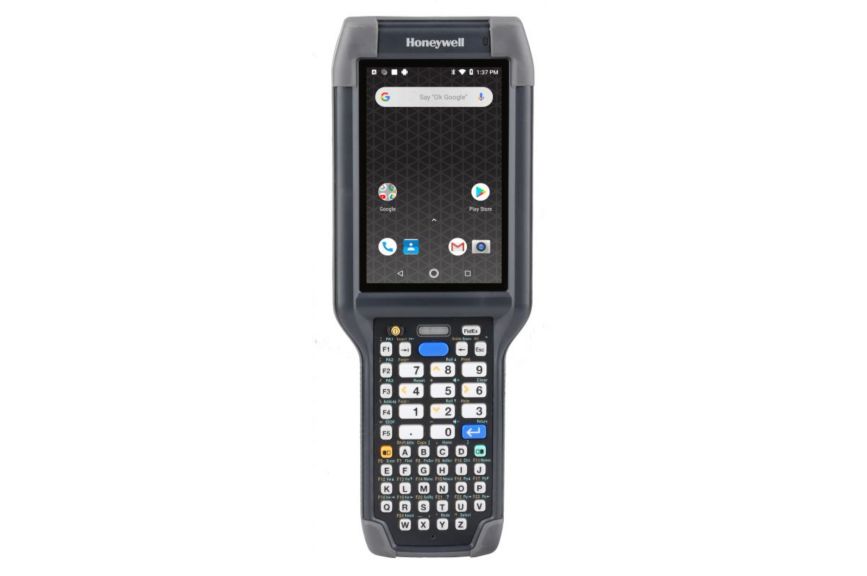


Honeywell CK65 Handheld Computer

Having the right mobile computer on hand is a great way to set your logistics team up for success, and the Honeywell CK65 Handheld Computer is up for the task. It runs on Android 10, and is powered by an octa-core Qualcomm Snapdragon processor with up to 4GB of RAM. The 4-inch LCD display makes it easy to view applications, menus, and other important data at a glance, while the terrific 7,000mAh battery ensures the devices won’t die in the middle of a shift. While the CK65 comes with 32GB of internal storage, you can add more with a microSD card. It also supports Bluetooth 5.0 and Wi-Fi, allowing it to remain connected to compatible networks and devices anywhere.

Honeywell CK65 Handheld Computer Specifications

Features
Description

Display

4” LCD (800 x 480p)

Camera

13MP rear

Model

CK65
Qualcomm 64-bit Snapdragon, octa-core @ 2.2GHz

Ports

USB, microSD

Operating System (OS)

Android 10; upgradable to Android 14

Battery

7,000mAh Li-Ion

Sensors

Bluetooth 5.0
802.11a/b/g/n/ac
Up to 4GB

Storage

32GB

Accessories

Weight (in grams)

499g
1 year

Dimensions

225.26 x 83.82 x 33.02mm

Security

Price

$$

SKU

CK65

What Does “Esper Supported” Mean?

Esper Supported devices have been tested by Esper in our labs or deployed at a sufficient scale by customers to prove they meet the bar for real-world deployment. When you choose an Esper Supported device, you’re getting hardware that is sufficiently vetted for use on our device management platform and ready for deployment at scale.

What is Esper Foundation for Android?

Esper Foundation for Android is an enterprise-grade operating system for company owned and managed hardware. It features long-term support, regular security patches, and customizable control over the entire experience, combined with robust and powerful device management tools. It’s the full-stack solution you’ve always dreamed of.

GET STARTED

Choose the Right Hardware for Your Application

Inadequate hardware can restrict the functionality of your system, resulting in a subpar experience and performance. Esper tackles this with:

Zero-Touch Provisioning

Ready-to-go Secure Remote Debugging

Remote View and Remote Control

Contact Us

Features of Esper Supported Devices

Remote Control and Debugging

Control, troubleshoot, and debug devices as if they’re right in front of you. From anywhere.

Learn More

Heading 1

Heading 2

Heading 3

Heading 4

Heading 5
Heading 6

Lorem ipsum dolor sit amet, consectetur adipiscing elit, sed do eiusmod tempor incididunt ut labore et dolore magna aliqua. Ut enim ad minim veniam, quis nostrud exercitation ullamco laboris nisi ut aliquip ex ea commodo consequat. Duis aute irure dolor in reprehenderit in voluptate velit esse cillum dolore eu fugiat nulla pariatur.

Block quote

Ordered list

  1. Item 1
  2. Item 2
  3. Item 3

Unordered list

  • Item A
  • Item B
  • Item C

Text link

Bold text

Emphasis

Superscript

Subscript

Unbreakable Kiosk Mode

Lock a single app to the screen with top-notch security. No breaking it, no getting around it.

Learn More

Heading 1

Heading 2

Heading 3

Heading 4

Heading 5
Heading 6

Lorem ipsum dolor sit amet, consectetur adipiscing elit, sed do eiusmod tempor incididunt ut labore et dolore magna aliqua. Ut enim ad minim veniam, quis nostrud exercitation ullamco laboris nisi ut aliquip ex ea commodo consequat. Duis aute irure dolor in reprehenderit in voluptate velit esse cillum dolore eu fugiat nulla pariatur.

Block quote

Ordered list

  1. Item 1
  2. Item 2
  3. Item 3

Unordered list

  • Item A
  • Item B
  • Item C

Text link

Bold text

Emphasis

Superscript

Subscript

Granular Software Deployment

Software delivery on your terms. Specific devices, groups, and app version control.

Learn More

Heading 1

Heading 2

Heading 3

Heading 4

Heading 5
Heading 6

Lorem ipsum dolor sit amet, consectetur adipiscing elit, sed do eiusmod tempor incididunt ut labore et dolore magna aliqua. Ut enim ad minim veniam, quis nostrud exercitation ullamco laboris nisi ut aliquip ex ea commodo consequat. Duis aute irure dolor in reprehenderit in voluptate velit esse cillum dolore eu fugiat nulla pariatur.

Block quote

Ordered list

  1. Item 1
  2. Item 2
  3. Item 3

Unordered list

  • Item A
  • Item B
  • Item C

Text link

Bold text

Emphasis

Superscript

Subscript

Automated Provisioning

Build custom blueprints to automate device provisioning and streamline setup. Over and over again.

Learn More

Heading 1

Heading 2

Heading 3

Heading 4

Heading 5
Heading 6

Lorem ipsum dolor sit amet, consectetur adipiscing elit, sed do eiusmod tempor incididunt ut labore et dolore magna aliqua. Ut enim ad minim veniam, quis nostrud exercitation ullamco laboris nisi ut aliquip ex ea commodo consequat. Duis aute irure dolor in reprehenderit in voluptate velit esse cillum dolore eu fugiat nulla pariatur.

Block quote

Ordered list

  1. Item 1
  2. Item 2
  3. Item 3

Unordered list

  • Item A
  • Item B
  • Item C

Text link

Bold text

Emphasis

Superscript

Subscript

Features of Esper Validated Devices

Full-Stack Compatibility

What you get: Total compatibility with every last feature across the entire Esper platform, guaranteed.

Heading 1

Heading 2

Heading 3

Heading 4

Heading 5
Heading 6

Lorem ipsum dolor sit amet, consectetur adipiscing elit, sed do eiusmod tempor incididunt ut labore et dolore magna aliqua. Ut enim ad minim veniam, quis nostrud exercitation ullamco laboris nisi ut aliquip ex ea commodo consequat. Duis aute irure dolor in reprehenderit in voluptate velit esse cillum dolore eu fugiat nulla pariatur.

Block quote

Ordered list

  1. Item 1
  2. Item 2
  3. Item 3

Unordered list

  • Item A
  • Item B
  • Item C

Text link

Bold text

Emphasis

Superscript

Subscript

Guaranteed Remote Control

Smooth, consistent remote access and debugging at enterprise scale.

Heading 1

Heading 2

Heading 3

Heading 4

Heading 5
Heading 6

Lorem ipsum dolor sit amet, consectetur adipiscing elit, sed do eiusmod tempor incididunt ut labore et dolore magna aliqua. Ut enim ad minim veniam, quis nostrud exercitation ullamco laboris nisi ut aliquip ex ea commodo consequat. Duis aute irure dolor in reprehenderit in voluptate velit esse cillum dolore eu fugiat nulla pariatur.

Block quote

Ordered list

  1. Item 1
  2. Item 2
  3. Item 3

Unordered list

  • Item A
  • Item B
  • Item C

Text link

Bold text

Emphasis

Superscript

Subscript

Ongoing Platform Alignment

Always in sync with future Esper and OS updates, ensuring dependable performance throughout the device lifecycle.

Heading 1

Heading 2

Heading 3

Heading 4

Heading 5
Heading 6

Lorem ipsum dolor sit amet, consectetur adipiscing elit, sed do eiusmod tempor incididunt ut labore et dolore magna aliqua. Ut enim ad minim veniam, quis nostrud exercitation ullamco laboris nisi ut aliquip ex ea commodo consequat. Duis aute irure dolor in reprehenderit in voluptate velit esse cillum dolore eu fugiat nulla pariatur.

Block quote

Ordered list

  1. Item 1
  2. Item 2
  3. Item 3

Unordered list

  • Item A
  • Item B
  • Item C

Text link

Bold text

Emphasis

Superscript

Subscript

Pre-Deployment Confidence

Hardware issues are identified and resolved before rollout, cutting deployment risk and post-sales overhead.

Heading 1

Heading 2

Heading 3

Heading 4

Heading 5
Heading 6

Lorem ipsum dolor sit amet, consectetur adipiscing elit, sed do eiusmod tempor incididunt ut labore et dolore magna aliqua. Ut enim ad minim veniam, quis nostrud exercitation ullamco laboris nisi ut aliquip ex ea commodo consequat. Duis aute irure dolor in reprehenderit in voluptate velit esse cillum dolore eu fugiat nulla pariatur.

Block quote

Ordered list

  1. Item 1
  2. Item 2
  3. Item 3

Unordered list

  • Item A
  • Item B
  • Item C

Text link

Bold text

Emphasis

Superscript

Subscript